Product photography
How to Sell on Vinted: Photos That Actually Sell
A practical guide to selling clothes on Vinted, covering the photo set that sells, pricing, descriptions and how to make listings look consistent.
Vinted is a photo app with a payment system attached. Buyers scroll a grid of images, and yours has about half a second to look like something worth tapping.
The good news is that the bar is low. Most listings are photographed on a bedroom floor at night. A photo taken by a window on a plain background will beat almost everything around it.
Here is the whole process: shooting, editing, listing, and pricing.
Put your clothes on a clean background →
Why do most listings fail?
Three reasons, in order of frequency.
- Dark, yellow photos. Taken indoors at night, under a warm bulb. The colour is wrong and the item looks tired.
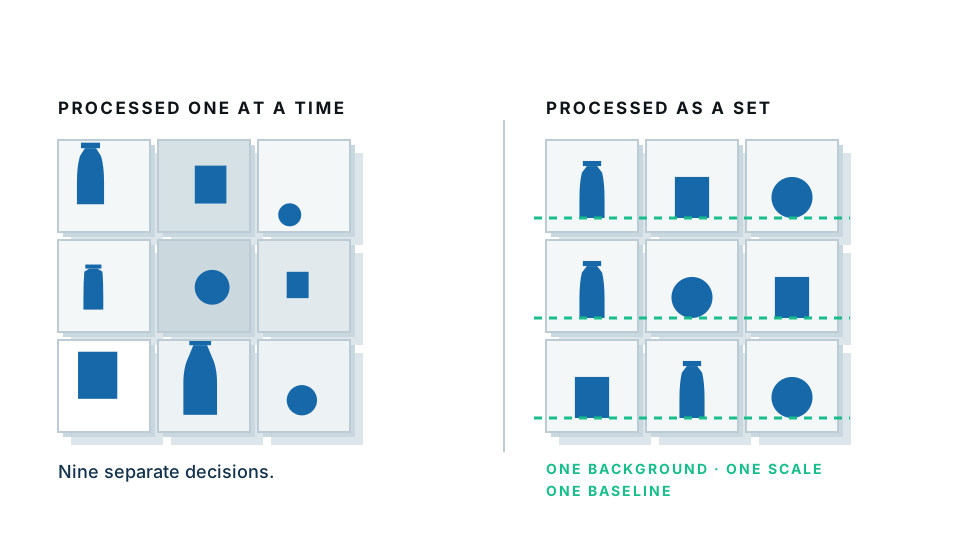
- Cluttered backgrounds. A duvet, a carpet, a laundry pile. The eye cannot find the item.
- Only one photo. Buyers who cannot see the label, the fabric or the flaws do not risk it.
All three are free to fix.
Part one: taking the photos
Where should I shoot?
Next to a window, during the day, with the room lights off.
That is genuinely the whole answer. Daylight is soft, neutral and free. Mixing it with a warm bulb creates a colour cast that makes white shirts look cream and grey knits look brown.
If your only free time is evening, shoot on a Saturday morning instead. Batching a whole wardrobe in one daylight session is faster anyway.
What should the item lie on?
Anything plain and light. In order of preference:
- A large sheet of white or light grey card.
- A plain white sheet, ironed or at least smoothed.
- A wooden floor or table, if it is uncluttered.
- A plain wall, for hanging items.
Avoid: patterned bedding, carpet, anything with a busy texture, and anything the same colour as the item.
How should I lay the item out?
For tops, knitwear and shirts:
- Lay flat, front up.
- Smooth every wrinkle with your hand.
- Fold the sleeves slightly inward so the shape reads as a garment rather than a star.
- Shoot from directly above, phone parallel to the floor.
For trousers and jeans:
- Lay flat, fold one leg slightly so the shape is not a plain rectangle.
- Photograph the waistband detail separately.
For dresses and coats:
- Hang them. On a door, a picture rail, a plain wall.
- Use a slim hanger, not a bulky wooden one.
For shoes and bags:
- Photograph at an angle, not flat on. Three-quarter view shows shape.
- Get the soles and any wear in a separate shot.
The photo set that sells
| Slot | Shot | Why |
|---|---|---|
| 1 | Whole item, flat or hung, plain background | This is your thumbnail — it does all the work |
| 2 | Worn, if fit matters | Buyers want to see it on a body |
| 3 | Brand label | Proves what it is |
| 4 | Fabric composition tag | Answers the most-asked question |
| 5 | Detail — texture, buttons, print | Sells quality |
| 6 | Any flaw, clearly | Prevents disputes and returns |
| 7 | Size label | Second most-asked question |
Photographing flaws honestly is not a weakness. It gets you fewer messages, fewer returns, and better ratings.
Part two: cleaning up the photos
Even a good photo on a good sheet has a shadow, a crease in the fabric behind, or a bit of floor in the corner. Removing the background fixes all of it at once and makes your whole wardrobe consistent.
- Open the white background maker.
- Drop the photo in.
- The garment is separated and placed on clean white.
- Download.
Our free preview runs inside your browser, so nothing is uploaded. It also means it keeps working if your connection drops mid-session.
Should every photo be on white?
No. Do the main photo on a clean background so the thumbnail is crisp. Leave the detail shots, label shots and worn shots as they are — they benefit from looking real.
The main photo is doing the selling. The rest are doing the reassuring.
A tip for consistency across a wardrobe
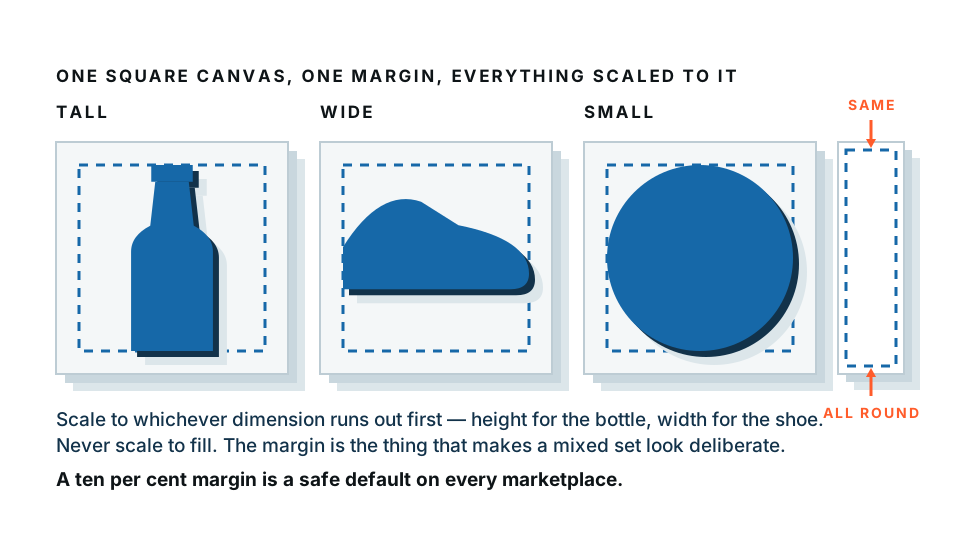
Shoot everything from the same height and distance, then crop every image to the same square canvas with the same margin. When a buyer opens your profile, thirty items in matching frames looks like a curated shop. Thirty items at random scales looks like a clear-out.
Part three: writing the listing
The title
Put the brand, item, size and colour in the title. Buyers search for exactly these words.
Good: Levi's 501 straight jeans, W28 L30, mid blue
Bad: Lovely jeans!! 😍
The description
Cover, in this order:
- What it is — brand, style, colour.
- Size — the label size, plus flat measurements. Chest, length, waist, inside leg. Measurements sell more than sizes because sizing varies wildly.
- Fabric — from the tag.
- Condition — honestly. “Worn twice”, “small mark on the hem, photographed”.
- Why you are selling — one line. “Too small for me now.” It humanises the listing.
Measurements are the single most under-used thing on Vinted. Listings with them get fewer questions and more sales.
Tags and categories
Fill in every field the app offers — brand, size, colour, condition, material. These are filters buyers use to narrow a search. An unfilled field means you are invisible to anyone using that filter.
Part four: pricing and bumping
- Search your item and see what similar condition examples sold for, not what they are listed at.
- Price slightly above what you will accept. Vinted buyers expect to offer.
- Include postage thinking in your price expectation.
- Bundle discounts genuinely work. Set one and mention it in the description.
- Relist rather than heavily discounting. A stale listing sinks in the feed; a fresh one surfaces.
If an item gets views but no sales
The problem is the main photo or the price, in that order. Reshoot before you discount. A better photo costs nothing; a discount costs money permanently.
A realistic Saturday plan
- Pile everything you want to sell in one room.
- Set up by the window — card down, phone propped, tape a mark for where items go.
- Shoot everything. Do not edit. Do not list. Just shoot.
- Break.
- Run the main photos through background removal in one batch.
- List in one sitting, copying your own description structure each time.
Forty items is doable in a day once you stop switching between modes.
Start with your best item
Pick the thing most likely to sell, reshoot it by a window, put it on a clean background, and relist it with measurements. If that works, do the rest.
Clean up your first listing photo — free, nothing uploaded →
Frequently asked
How many photos should a Vinted listing have?
Use all the slots you can. Five to eight is the sweet spot: a main shot, the item worn or laid flat, the label, the fabric composition tag, a detail, and clear photos of any flaws.
Do clothes sell better on a hanger or laid flat?
Laid flat on a plain surface photographs best and is fastest. Worn photos sell better for anything where fit matters, like dresses and jeans. Do both if you can.
Should Vinted photos have a white background?
The platform does not require it, but a clean, consistent background makes your whole wardrobe look like a shop rather than a pile. It is one of the cheapest ways to look more professional.
Why is my item getting views but no sales?
Almost always the main photo or the price. Reshoot the main photo in daylight on a plain background before you drop the price.
Is it safe to edit photos of my clothes online?
Our free preview processes images entirely in your browser, so nothing gets uploaded. That also means it works offline once the page has loaded.